Downloads
 Pzorb Home
 RM Networks
 Downloads
 Guestbook
 Links
 Email

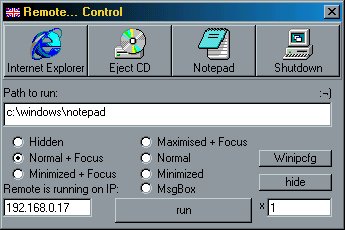
The first version of Remote consisted of two parts; remote.exe and local.exe . The first program, remote.exe is to be run on the computer that you wish to control. Local.exe is the program that commands the computer running remote.exe, and therefore should be run on another computer. Both files require Visual Basic 6 run-time DLLs, that can be downloaded here. Also, the program was designed for a specific network, and the run strings for the icons have been �hard wired� in, so clicking on the Internet Explorer icon brings up the path of my network�s location of iexplore. The Eject CD icon only works when the remote computer has a CD in the primary CD drive. The network between the two computers must support UDP on port 6666. Plus, there are lots of easter eggs included in the program that are either triggered by simply typing in the easter egg and viola, or typing the Easter egg in and pressing run. The program was designed on an Intel P200 MMX with 64 MB RAM, and in Windows 98 with VB6.

Here is a screenshot of remote.exe :

Picture

Download it here !!

But what about the new version ??

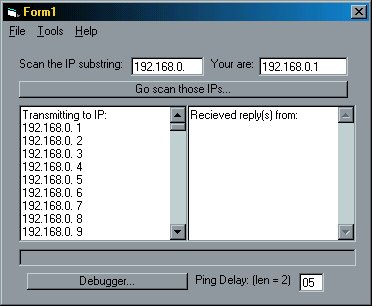
Well, the new version is very much still in beta production. It features, as well as the original remote.exe, one exe file for both local and remote, an IP scanning tool, a system information ActiveX control that relays remote computer configuration and logon information, multiple control of more than one computer at once, higher compatibility for networks with DLL and file restrictions, and an improved GUI (not yet implemented).

As you can see, the IP scanning program sends out UDP requests between a certain range of IP addresses. For anyone with a knowledge of network protocols, the usage of UDP is obvious. A time delay for replies is also sent, to provide for high latency between two computers.

Picture
Picture

You can�t download it !yet!

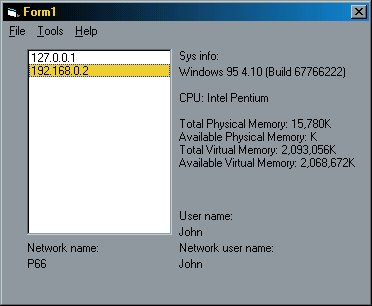
The system information (big thanks to E.Spencer for the sysinfo source code) provides detailed information about either the local computer, or any other computer found by the IP scan utility, and is still running. Also the local user name, network user name, and network computer name are given, so you can see who is using a certain workstation.

Picture
[Pzorb Home] [RM Networks] [Downloads] [Guestbook] [Links] [Email]